Getting zero views on your Shorts is not always a content problem. Most of the time, it is a tagging problem.
YouTube uses metadata, including tags, to understand the content and context of your video. Your YouTube shorts tagging setup is what tells the algorithm which audience to serve your Short to. Without the right signals, even well-produced content gets ignored.
Tags are not magic words. They are data points you feed the algorithm to trigger accurate categorization and distribution.
By the end of this guide, you will know how to:
- Tell the difference between visible hashtags for YouTube shorts and hidden metadata tags, and how to use both
- Build a 3-tier tags for YouTube shorts strategy that gives the algorithm a clear, consistent signal
- Avoid the specific tagging mistakes that suppress reach across every niche
Tags vs. Hashtags: Clearing the Confusion
Most creators use the terms tags and hashtags interchangeably. They are two different things, and confusing them is one of the main reasons YouTube shorts tagging setups fail.
| Feature | Hashtags | Metadata Tags |
|---|---|---|
| Visibility | Visible to viewers | Hidden, only in YouTube Studio |
| Placement | Video title or description | Tags field in upload settings |
| Function | Discovery in the Shorts feed | SEO and search ranking |
| Clickable | Yes, leads to similar content feed | No |
| Example | #Shorts, #GamingTips | "how to get views on shorts" |
Hashtags for YouTube shorts appear directly in your video title or description and are clickable, leading viewers to a feed of similar content. They are a discovery tool, designed to pull in viewers who are browsing by topic or trend.
Metadata tags are added in the Tags field inside YouTube Studio during upload. They are invisible to viewers but are read directly by the algorithm to determine your content's topic, category, and search relevance. These are where you place long-tail keyword phrases that describe exactly what your video covers.
Both work together as part of a complete YouTube shorts tagging strategy. Hashtags drive feed discovery. Metadata tags drive search ranking. Relying on one without the other leaves half your distribution potential unused.
One important clarification: #Shorts is a hashtag, not a metadata tag. It belongs in your description, not the Tags field. Its sole function is to signal to YouTube that the video should be classified and distributed as a Short.
The 3-Tier Hashtag Strategy for Discovery
Random YouTube shorts tagging produces random results. This 3-tier framework gives the algorithm three distinct signals in one description: what format the content is, who it is for, and who made it.
The Golden Ratio is 1 Broad tag, 2 Niche tags, 1 Brand tag. Four hashtags, each serving a specific purpose.
Tier 1: Broad Discovery Tags
Broad tags signal the content format to YouTube before anything else. The most important one is #Shorts. Using #Shorts is essential because it tells the YouTube system to classify and distribute the video as a Short, triggering the Shorts feed.
Without it, YouTube may index your vertical video as a standard upload and distribute it through the wrong feed entirely.
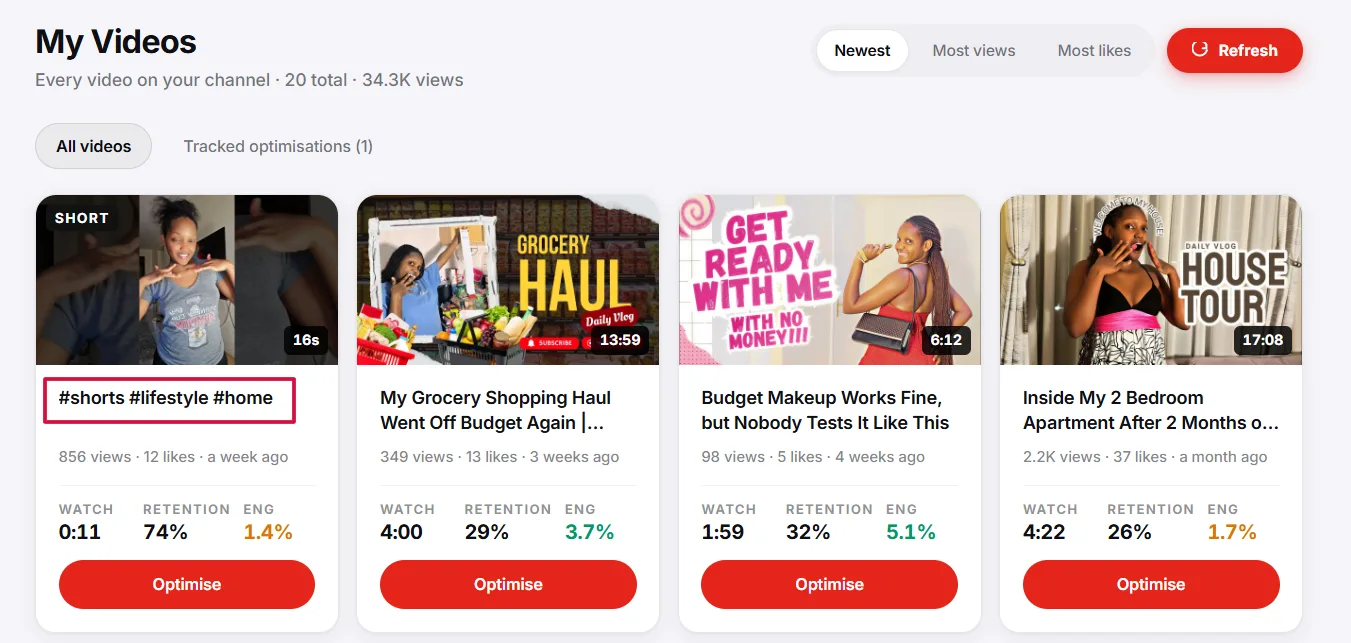
Keep Tier 1 to one or two tags maximum. Options include #Shorts, #Trending, and #Viral. More than two broad tags dilutes the signal without adding distribution value.
Pro Tip: Always place #Shorts in the description, not the title. Putting hashtags in the title makes it look cluttered and reduces click-through rate. Keep the title clean and clickable.
Tier 2: Niche-Specific Tags
Niche tags are where trending hashtags for YouTube shorts do their real work. These tags tell the algorithm exactly which audience segment your content belongs to, connecting your Short to viewers already watching competitor content.
For a cooking channel, this means tags like #RecipeShorts or #QuickMeals. For gaming, it means #GamingTips or #PCGaming. The more specific the tag, the more accurate the audience match.
Use two niche tags per upload. One broad niche tag (e.g., #Gaming) and one specific sub-niche tag (e.g., #FPSGaming) gives the algorithm both a wide and a narrow categorization signal.
Pro Tip: Use YouTube's autocomplete to find YouTube shorts trending hashtags in real time. Type your niche keyword into the YouTube search bar and note what appears. These are active, high-traffic tags already being used by your target audience.
Tier 3: Brand and Series Tags
Brand tags group your content together and train the algorithm to recognize your channel as a consistent source within a specific niche. Use your channel name or a recurring series title as a hashtag.
For example, if your channel is TechWithJames, use #TechWithJames on every upload. Over time, YouTube begins associating that tag with your content category and viewer profile.
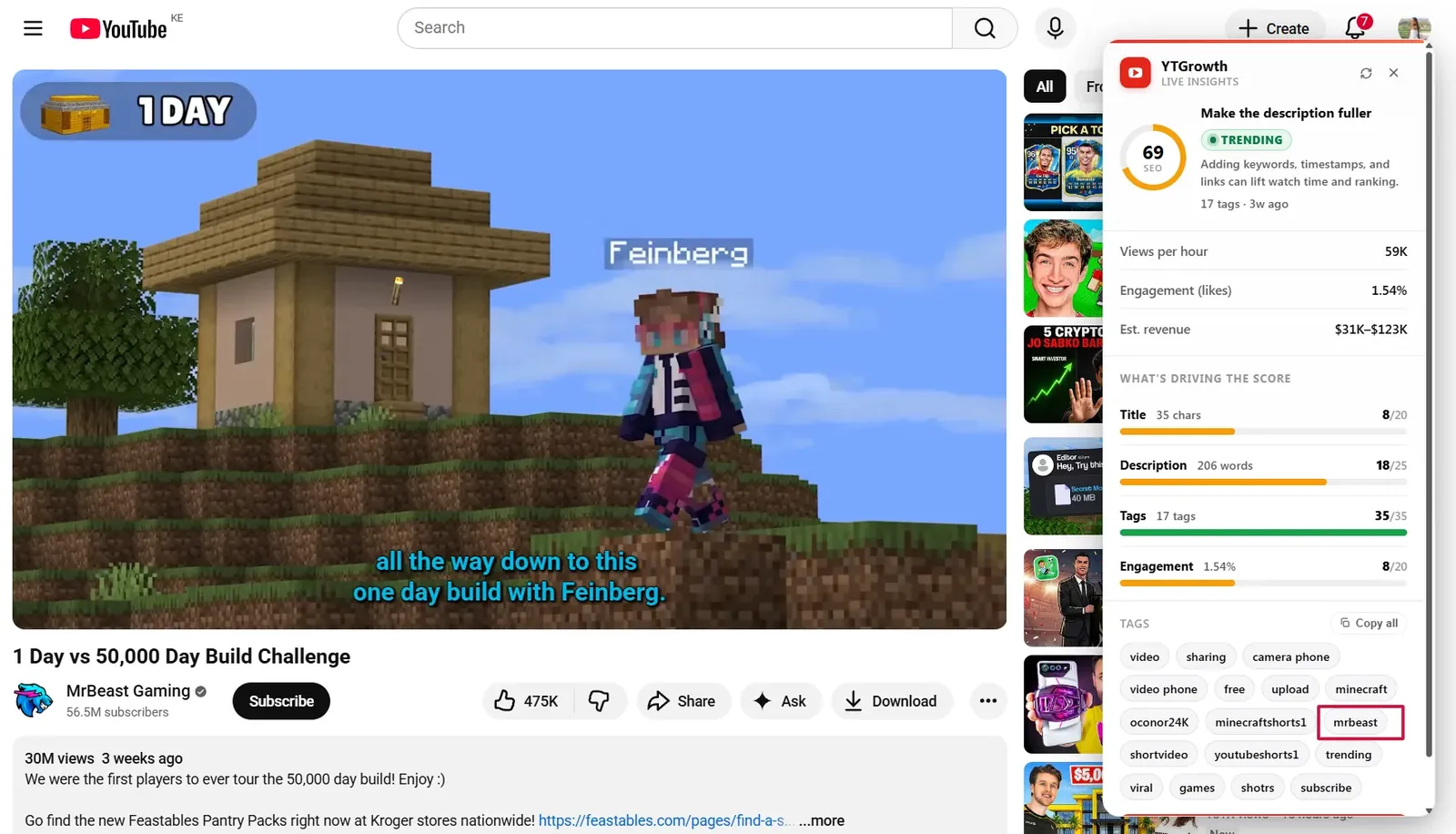
This tier also helps viewers find more of your content directly. Clicking a brand hashtag pulls up every Short you have tagged with it, functioning as a self-contained content library.
Pro Tip: Keep your brand tag consistent across every upload. Changing it between videos breaks the grouping signal and reduces its long-term SEO value.
Hidden Metadata: Optimizing the 'Tags' Field in YouTube Studio
Most creators stop at hashtags and ignore the Tags field entirely. This is a missed SEO opportunity. The Tags field in YouTube Studio is where your YouTube shorts tagging strategy gets its search ranking power.
Here is how to access and fill it correctly:
- Go to YouTube Studio and click Create, then Upload Video.
- On the details page, scroll down and click More Options.
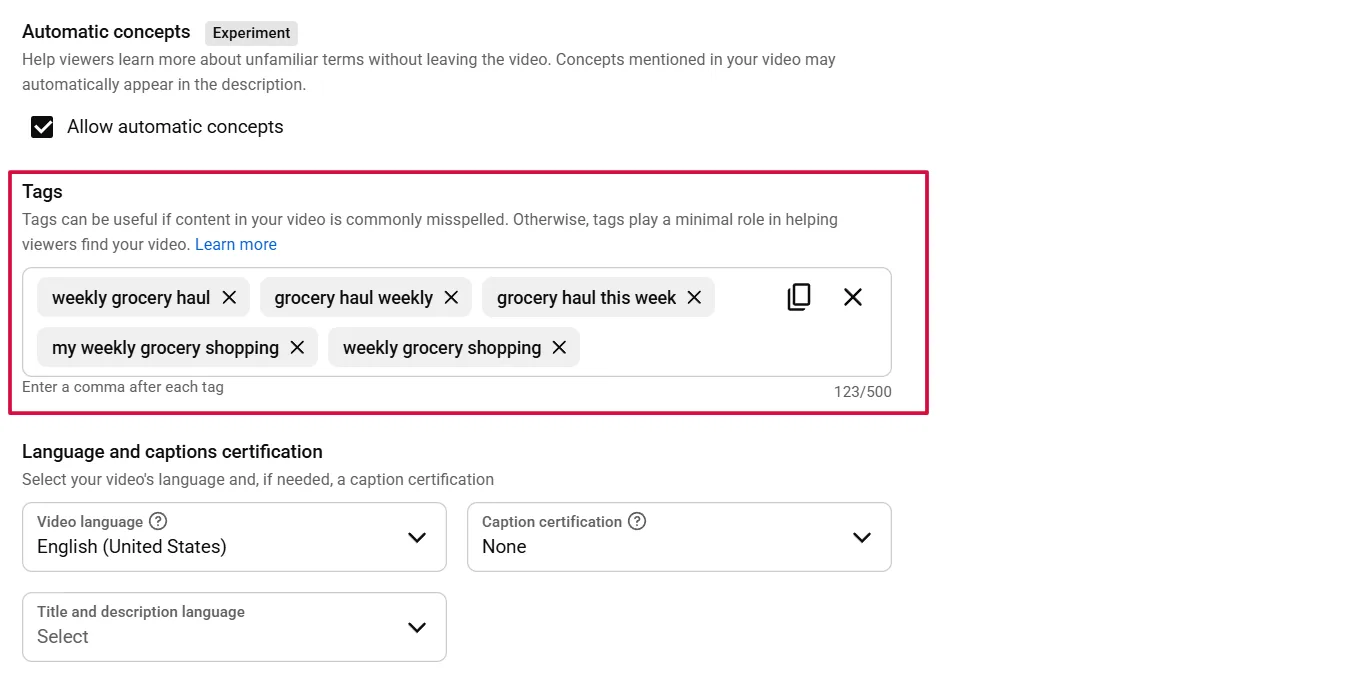
- Locate the Tags field. This is where you add your hidden metadata tags.
- Add your tags separated by commas. YouTube allows up to 500 characters in this field.
- Click Save once your tags are in place before publishing.
The screenshot below shows the Tags field sitting below the Language and Caption settings in the More Options panel. It is easy to miss on the first upload.
What to put in the Tags field
Use long-tail keyword phrases that describe exactly what your video covers. For example, "how to get more views on YouTube shorts", "youtube shorts hashtags for views", or "best settings for YouTube shorts" are all valid metadata tags. These phrases match what viewers are actively searching for.
Also include common misspellings of your niche keywords. If your niche is "fitness," add "fitniss" or "fitnes" as tags. YouTube's algorithm cross-references these against search queries and uses them to surface your content in relevant results.
A YouTube shorts tag generator tool like TunePocket or RyRob can help you identify high-volume keywords your competitors are already ranking for. Run your main topic through one of these tools before every upload to find tags you may have missed.
Warning: Do not stuff the Tags field with irrelevant keywords. Adding 500 characters of unrelated tags to chase trending topics is classified as misleading metadata by YouTube. This can result in a strike against your channel or suppressed distribution across all your content, not just the video in question.
Keep your tags tightly relevant to the specific video. Ten accurate tags outperform fifty vague ones every time.
Research your Shorts tags with live search dataKeyword Explorer surfaces the long-tail phrases viewers type, scored by volume and competition, so your metadata tags are built on demand instead of guesswork.Try Keyword Explorer →Niche-Specific Viral Tags: Copy and Paste Starters
These lists are starting points, not final answers. Use them to build your Tier 2 niche tags, then refine based on what is trending in your specific sub-niche. Trending hashtags for YouTube shorts change seasonally, and event-based tags like #Christmas or #Challenge spike in short windows, so check the YouTube Explore page regularly to stay current.
Gaming
- #gaming
- #pcgaming
- #fps
- #mobilegaming
- #gamingshorts
- #[GameName] (always include the specific game title you are playing)
Food and Cooking
- #foodshorts
- #recipeshorts
- #quickmeals
- #cookingvideo
- #foodtiktok
- #easyrecipes
Tech
- #techtips
- #techshorts
- #gadgets
- #howto
- #techreview
- #androidtips
Education and Tutorials
- #learnontiktok
- #edutok
- #studytips
- #didyouknow
- #howtoplay
- #tips
Comedy and Entertainment
- #funny
- #relatable
- #comedy
- #shortsfired
- #funnyshorts
- #trending
These tags cover the broad and niche tiers. Your brand tag still needs to be added on top of whichever list you use.
For tags for YouTube shorts gaming specifically, always pair a broad gaming tag with the exact game title. #Gaming alone puts you in a pool of millions. #Gaming + #WarzoneTips narrows the algorithm's categorization to a specific, high-intent audience.
The lists above are a foundation. To find what is working right now in your niche, use the Competitor Analysis feature in YTGrowth to see which tags and title patterns your top competitors are building content around. That data is pulled from real channel performance, not guesswork.
Common Tagging Mistakes That Kill Your Reach
Bad YouTube shorts tagging advice is everywhere, and most of it comes from creators who never tested what they recommend. These are the four mistakes that directly suppress distribution.
Mistake: Stuffing hashtags into your video title
Fix: Keep your title clean and keyword-focused. Place all hashtags in the description instead. A title loaded with hashtags reads as spam to both the algorithm and the viewer, and it reduces click-through rate by making the title harder to read.
Mistake: Using irrelevant trending tags to chase views
Fix: Only use tags that accurately describe your video. Over-tagging or adding irrelevant tags can trigger a misleading metadata strike from YouTube, which suppresses distribution across your entire channel, not just the video in question.
Mistake: Ignoring the first three lines of your description
Fix: Place your most important YouTube shorts hashtags within the first three lines of the description. On mobile, YouTube displays the first hashtag above the video title. That position is valuable real estate and most creators waste it with a generic caption.
Mistake: Skipping YouTube Autocomplete for tag research
Fix: Type your topic into the YouTube search bar and use the autocomplete suggestions as tag ideas. These are real search queries from real viewers. They reflect current demand better than any static tag list.
For a deeper view of which keywords are driving traffic in your niche right now, the Keyword Explorer in YTGrowth pulls live search data so your YouTube shorts hashtags for views are based on actual search volume, not guesswork.
Frequently Asked Questions
What is the difference between hashtags and tags on YouTube Shorts?
Hashtags are visible to viewers, placed in the title or description, and clickable into a feed of similar content. Metadata tags are hidden, entered in the Tags field inside YouTube Studio, and read only by the algorithm for search ranking. Hashtags drive feed discovery; metadata tags drive search relevance, and a full strategy needs both.
How many hashtags should I use on a YouTube Short?
Four, following a 1 broad, 2 niche, 1 brand ratio. One broad tag like #Shorts signals format, two niche tags target the specific audience segment, and one consistent brand tag groups your uploads together. More than that dilutes the signal without adding distribution value.
Where should the #Shorts hashtag go?
In the description, not the title. #Shorts tells YouTube to classify and distribute the video through the Shorts feed specifically. Putting hashtags in the title makes it read as cluttered and reduces click-through rate, so keep the title clean and put every hashtag in the description instead.
What should I put in the Tags field in YouTube Studio?
Long-tail keyword phrases that describe exactly what the video covers, up to 500 characters total, plus common misspellings of your niche keywords. YouTube cross-references these against real search queries to decide where your video surfaces.
Can too many tags hurt my YouTube Shorts?
Yes. Stuffing the Tags field with irrelevant keywords to chase trending topics reads to YouTube as misleading metadata, which can suppress distribution across the whole channel, not just the video in question. Ten accurate tags outperform fifty vague ones.
Do hashtags help YouTube Shorts get more views?
Yes, when they genuinely match the content. Hashtags give the algorithm a clear audience-segment signal and give viewers a clickable path into more of your work. They do not replace content quality, but a well-produced Short with no tagging strategy is still leaving distribution on the table.
Where is the best place to find trending hashtags for my niche?
YouTube autocomplete and the Explore page, since both reflect real, current search behavior rather than a static list that goes stale within weeks. Type your niche keyword into the search bar and note what YouTube suggests before every upload.
Tag With Intent, Not Volume
Effective YouTube shorts tagging is not about adding as many tags as possible. It is about giving the algorithm three clear signals: what format the content is, who it is for, and what it is about.
Use the 3-tier framework on every upload. Keep your hashtags for YouTube shorts in the description, not the title. Fill the Tags field in YouTube Studio with specific long-tail phrases. And never use a tag your video does not directly relate to.
The creators getting consistent views on viral hashtags for YouTube shorts are not guessing. They are researching what works in their niche, applying a repeatable system, and refining it upload by upload.
If you want to see exactly how your current tagging and SEO holds up against competing channels, the SEO Studio and Keyword Explorer in YTGrowth give you a full picture of where your discoverability stands and what to fix first.
Good tagging does not guarantee virality. It guarantees the algorithm has everything it needs to put your content in front of the right audience. That is where growth starts.