A YouTube title has two jobs. The first is to tell the algorithm what your video is about so it appears in the right search results. The second is to give the viewer a specific reason to click when they see it in their feed.
Most creators optimize for one and ignore the other. A title built purely around a keyword ranks in search but loses the click to a more compelling competitor. A title built purely for curiosity earns clicks from browse traffic but never appears in search results at all.
How to write a good YouTube title means solving both problems in under 60 characters. This guide covers the core rules, proven title formulas, and a three-question test you can run on every title before publishing to make sure it works on both levels.
What Makes a YouTube Title Work
Every title you write is being evaluated by two audiences simultaneously: the YouTube algorithm and the viewer scrolling their feed. Both need to be satisfied for a title to perform well.
The algorithm reads your title to categorize your video and match it to relevant search queries. It weights keywords that appear early in the title more heavily than those buried at the end. A title with a clear, specific keyword signal gets indexed accurately. A vague or stuffed title gets misread or ignored.
The viewer reads your title to decide whether clicking is worth their time. They are scanning a feed of competing thumbnails and titles in under two seconds. A title that communicates a clear benefit, outcome, or curiosity gap earns the click. A title that is generic, vague, or misleading loses it.
| Title Type | Search Performance | CTR Performance |
|---|---|---|
| Keyword only ("YouTube Title Tips") | Strong | Weak |
| Click-bait only ("You Won't Believe This") | Weak | Short-term spike, long-term drop |
| Both combined ("How to Write a YouTube Title That Gets Clicked") | Strong | Strong |
How to write good YouTube titles that satisfy both audiences requires putting the primary keyword early in the title and building the rest of the title around a specific benefit or outcome the viewer gets by watching. That combination is the foundation every formula in this guide is built on.
How to Write a Good YouTube Title: The Core Rules
Before applying any formula, five rules apply to every title regardless of niche, format, or content type. Breaking any one of them limits either your search ranking, your CTR, or both.
Rule 1: Put Your Primary Keyword in the First 40 to 60 Characters
YouTube weights keywords that appear early in the title more heavily for search ranking. Viewers scanning a feed read left to right and make click decisions based on the first few words. A keyword buried at the end of a long title carries less SEO weight and less viewer impact than one placed at the front.
Rule 2: Keep Your Title Between 40 and 65 Characters
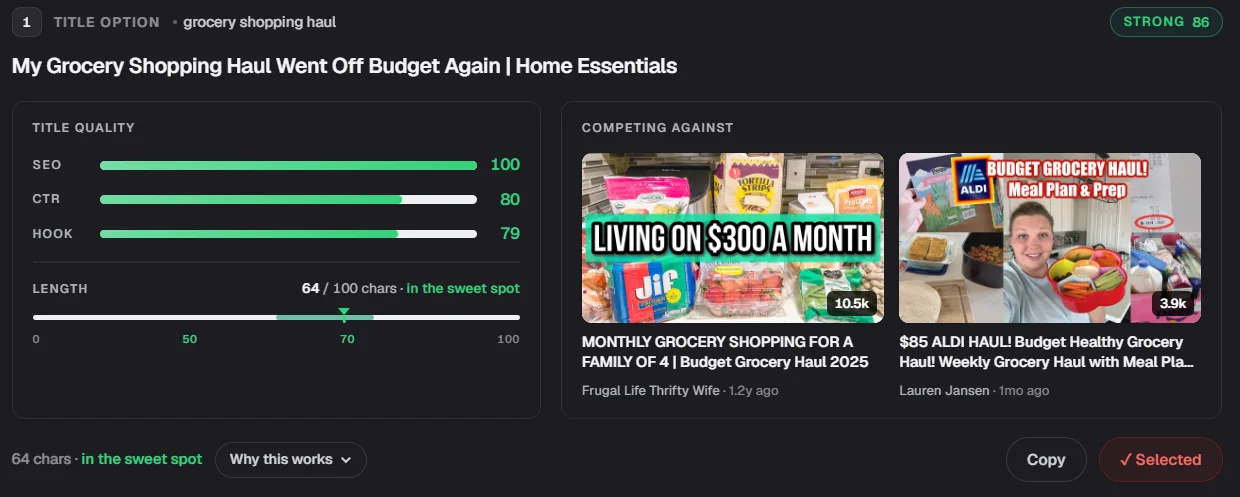
YouTube displays approximately 60 characters in desktop search results and roughly 50 on mobile feeds. A title that runs longer than 65 characters gets truncated and the most important part of your message may never be seen. Length itself barely moves performance: our own 28,947-video study found a correlation of 0.0046 between title length and how a video performs, essentially none. Use this 40-to-65 range to avoid truncation, not because a longer or shorter title performs better.
Rule 3: Use Specific Numbers and Details Over Vague Claims
"How to Save Money" is vague. "How to Save $500 a Month on a Tight Budget" is specific. Specific titles signal credibility, set clear expectations, and consistently outperform vague ones on CTR because they tell the viewer exactly what they are getting before they click.
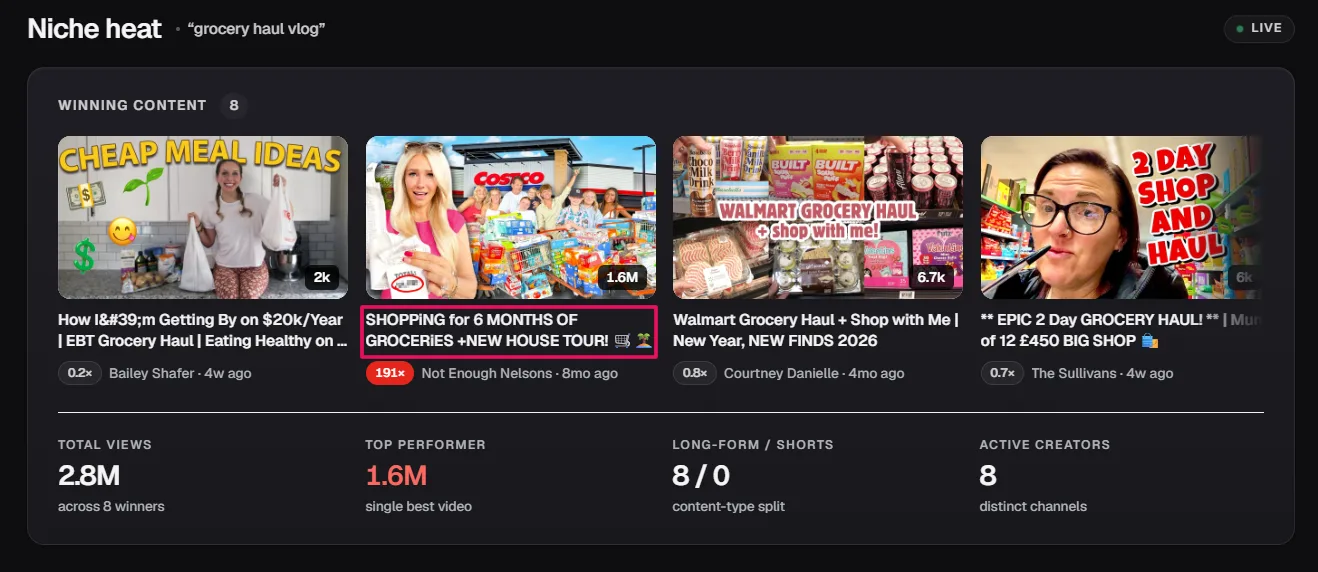
Rule 4: Do Not Keyword Stuff
YouTube's algorithm now understands content at a semantic level. It reads your transcript, analyzes your visuals, and builds a full picture of your video's topic beyond the title alone. Repeating the same keyword multiple times in a title does not improve ranking. It makes the title harder to read and reduces CTR without any SEO benefit.
Rule 5: Write the Title Before You Write the Script
A title written before filming forces clarity on what the video is about. A title written after filming often reflects what was covered rather than what the viewer is searching for. Starting with the title aligns your entire script around a specific viewer intent from the first sentence.
How to Write the Best Title for Your YouTube Video Using Proven Formulas
Formulas give you a repeatable structure that balances keyword placement and click motivation without starting from a blank page on every upload. Each formula below includes the pattern and a specific example.
Formula 1: How to + Outcome + Constraint
The most reliable search-friendly formula. It matches how-to search intent directly and adds a constraint that makes the outcome feel more achievable.
Example: "How to Lose Weight Without Going to the Gym"
Formula 2: Number + Things + Result
Numbers signal specific, structured content and consistently outperform non-numbered titles on CTR. The result tells the viewer what they get from the list.
Example: "7 YouTube Mistakes That Are Killing Your Views"
Formula 3: Why + Common Belief + Is Wrong
Challenges an assumption the viewer already holds, which creates enough curiosity to earn the click even from viewers who were not actively searching for the topic.
Example: "Why Posting Every Day Is Hurting Your Channel"
Formula 4: The Truth About + Topic
A curiosity gap formula that implies the viewer is missing something important. Works best when the video genuinely delivers a perspective most content in the niche does not cover.
Example: "The Truth About YouTube Monetization Nobody Tells You"
Formula 5: X vs Y
Comparison intent is one of the highest-CTR search patterns on YouTube because the viewer is actively making a decision and wants a clear verdict.
Example: "TubeBuddy vs vidIQ: Which One Is Worth It"
Formula 6: The Warning or Mistake Pattern
Negative framing triggers a stronger click response than positive framing in most niches because viewers are more motivated to avoid a loss than to achieve a gain.
Example: "Stop Making These 5 YouTube Title Mistakes"
Formula 7: Number + Adjective + Topic + Result
Combines specificity, an emotional modifier, and a clear outcome into one tight title structure.
Example: "12 Proven Strategies to Get More Views on YouTube"
Pro Tip: Write three to five title variations using different formulas before choosing the strongest one. The first title you write is rarely the best one. Running multiple variations forces you to find the most compelling angle rather than defaulting to the most obvious phrasing.
How to Write Title and Description in YouTube Together
Your title and description are not two separate tasks. They are two parts of the same signal you send to YouTube about what your video covers and who it is for. A strong title with a weak description leaves half that signal incomplete.
The description's first two sentences carry the most SEO weight of anything you write below the title. YouTube reads those opening lines as the primary context for your video's topic alongside the title itself.
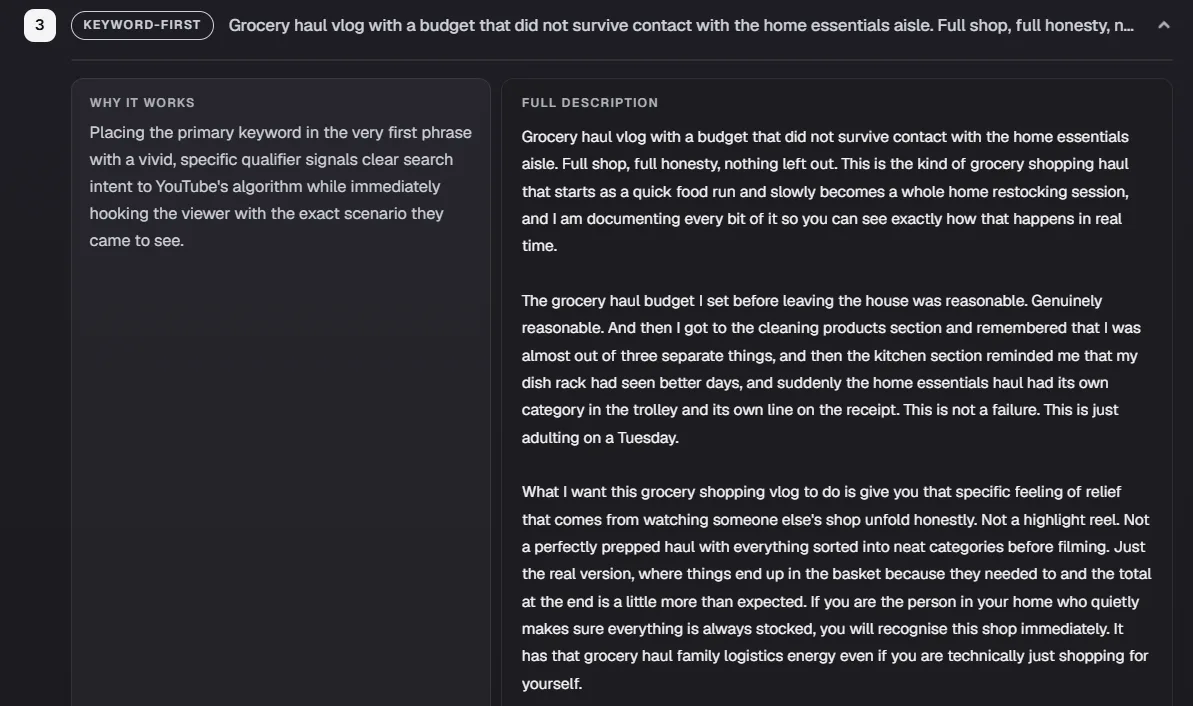
Place your primary keyword naturally in the first sentence and a supporting keyword variation in the second. Everything after that is written for the viewer, not the algorithm.
How to write title and description in YouTube as a connected system:
- The title states the promise: The opening two lines of the description restate and expand it with natural keyword variation.
- The title targets the primary keyword: The description targets supporting long-tail variations that the title does not have room for.
- The title earns the click: The description confirms to the viewer who has already clicked that they are in the right place.
A description that simply repeats the title word for word adds no additional keyword signal and no additional viewer value. Restate the promise in different words, add one or two supporting details, and move into the body of the description from there.
Score every title against the live YouTube nicheSEO Studio runs your title, description, tags, and hashtags against the top-ranking videos in your niche, then pushes the winning combination to YouTube with one click. Free to try.Try SEO Studio →How Your Thumbnail and Title Work as a Pair
Your thumbnail and title are evaluated together by every viewer who sees your video in a feed. They are not two separate creative decisions. They are one combined packaging unit and the strongest combinations treat them that way.
The thumbnail's job is to create the hook. The title's job is to deliver the context. When both are designed around the same message, the viewer gets a complete picture of what the video offers in under two seconds. When they repeat each other, half the available communication space is wasted.

A thumbnail showing a shocked face next to the words "THIS CHANGED EVERYTHING" paired with a title that says "This Changed Everything" tells the viewer nothing specific. A thumbnail showing the same shocked face paired with a title that says "Why I Deleted My Best-Performing Video" uses both elements to communicate something specific and curiosity-driven that neither could achieve alone.
The Test for a Strong Thumbnail and Title Combination
Cover the thumbnail and ask whether the title alone gives the viewer enough reason to click. Then cover the title and ask whether the thumbnail alone communicates the video's topic clearly. If both pass independently, the combination will be stronger than either on its own.
For new uploads, the Thumbnail IQ feature in ytgrowth.io scores your thumbnail against niche benchmarks before you publish, so you can confirm the visual side of your packaging is competitive before pairing it with your title.
Title Mistakes That Kill CTR
Knowing how to write a YouTube title that performs well is only half the equation. The other half is knowing which habits consistently suppress CTR and fixing them before they become patterns across your entire library.
Mistake 1: Clickbait That Overpromises
A title that overpromises inflates clicks in the short term. When viewers land on a video that does not deliver what the title suggested, they leave early. That drop-off tells YouTube the content is not relevant and the algorithm pulls back on distribution.
The fix is straightforward: write a title that accurately reflects what the video delivers. Strong CTR built on accurate expectations produces better long-term results than a spike built on disappointment.
Mistake 2: Keyword Stuffing
"How to Write YouTube Titles, Best YouTube Title Tips, YouTube Title SEO 2026" is not a title. It is a tag list formatted as a sentence. Keyword stuffing makes titles unreadable and reduces CTR without improving search ranking. Include one primary keyword naturally and let the description and tags handle supporting keyword variations.
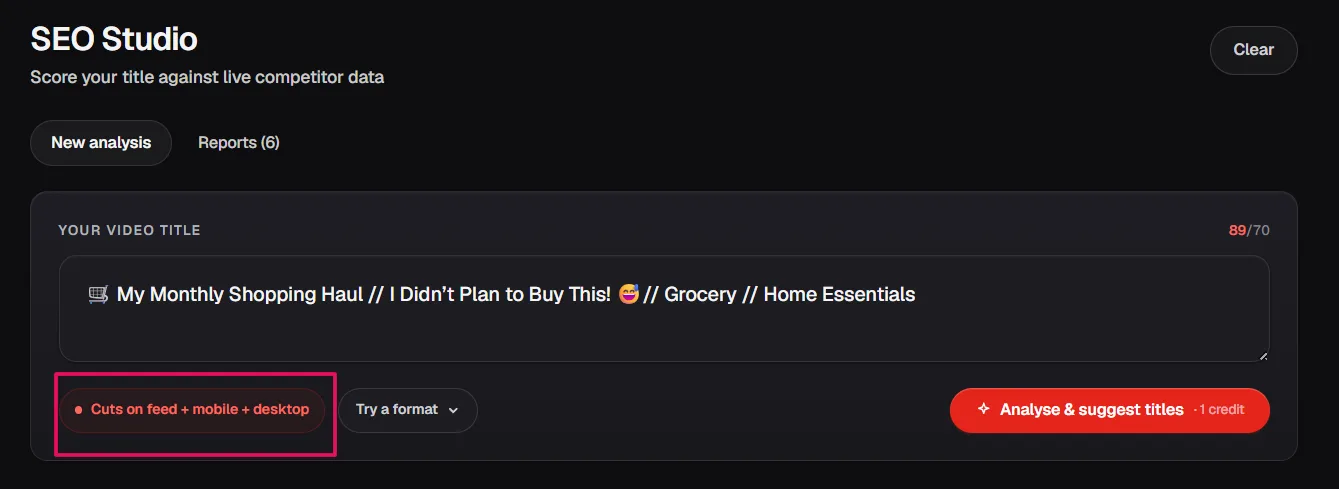
Mistake 3: Title Too Long for Mobile
A title that runs past 65 characters gets truncated on mobile feeds where the majority of YouTube traffic originates. If the most compelling part of your title sits beyond the 60-character mark, most viewers will never see it. Write the title, count the characters, and cut anything that does not earn its place.
Mistake 4: Thumbnail and Title Repeating the Same Message
Covered in the previous section but worth reinforcing here as a CTR mistake. When both elements say the same thing, the combined packaging communicates no more than either element does alone. Use the thumbnail and title to complement each other, not duplicate each other.
The Three-Question Test Before You Publish
Before finalizing any title, run it through three questions. A title that passes all three is ready to publish. A title that fails any one of them needs another revision.
Question 1: Does It Include My Primary Keyword Naturally?
Read the title out loud. If the keyword sounds forced or interrupts the natural flow of the sentence, it needs to be rewritten. A keyword placed naturally reads as a normal sentence to a viewer and as a clear topic signal to the algorithm. Both outcomes require the same thing: a keyword that fits the title rather than a title built around the keyword.
Question 2: If I Saw This Alongside 10 Competitor Titles, Would I Click It?
Open YouTube and search your primary keyword. Look at the titles currently ranking for that query. Read your title alongside them as a viewer with no investment in your channel. If it does not stand out or offer something the competing titles do not, it needs a stronger benefit, a more specific number, or a more compelling angle before it is ready.

Question 3: Does It Accurately Reflect What the Video Delivers?
A title that sets an expectation the video does not meet produces early drop-offs that suppress distribution. Every word in the title should correspond to something the video delivers. If the title promises a transformation, the video needs to deliver one. If it promises a specific number of tips, that number needs to be in the video.
Pro Tip: Write three to five title variations before choosing the final one. Run each variation through the three-question test and pick the one that passes most convincingly. The first title you write is rarely the strongest one.
Frequently Asked Questions
How Long Should a YouTube Title Be?
Keep your title between 40 and 65 characters to avoid mobile truncation, where the majority of YouTube traffic originates. That is a display constraint, not a performance one: our 28,947-video study found next to no relationship between title length and how a video performs, so treat 40 to 65 characters as a safe range rather than a target to hit.
Should I Put My Keyword at the Beginning of My YouTube Title?
Yes. Place your primary keyword within the first 40 to 60 characters of the title. YouTube weights keywords that appear early more heavily for search ranking, and viewers scanning a feed read left to right and make click decisions based on the first words they see.
Can I Change a YouTube Title After Publishing?
Yes. You can update a title at any time inside YouTube Studio by opening the video's details page and editing the title field directly. Updating a title on an existing video can improve CTR and trigger a fresh distribution test from the algorithm, making it one of the easiest ways to revive a video that has stopped performing.
How Do I Know if My YouTube Title Is Working?
Check your CTR in YouTube Studio under the Reach tab within the first 48 hours of publishing. A CTR below 4% on a new upload signals the title or thumbnail is not converting impressions into clicks. If impressions are strong but CTR is weak, the title is the first variable to update.
Should I Use the Same Title Formula for Every Video?
No. Different content types perform better with different formulas. How-to content performs best with the outcome plus constraint formula. List content performs best with a numbered title. Commentary and opinion content performs best with curiosity gap or challenge formulas. Study which formula your highest-CTR videos use and apply it to similar content going forward.
Your Title Is the First Thing That Either Works or Doesn't
Every view your video gets starts with a title decision. A viewer saw your title, decided it was worth their time, and clicked. Everything that happens after that click depends on your content. Everything before it depends on your title.
How to write a YouTube title that performs well is not a creative skill. It is a repeatable process. Research the keyword before you write anything. Apply a formula that matches the content type. Keep it under 65 characters. Run it through the three-question test. Pair it with a thumbnail that complements rather than repeats it.
That process applied consistently across every upload compounds into a channel where strong CTR becomes the norm rather than the exception.
If you want to take the guesswork out of optimizing your full video metadata beyond the title, the SEO Studio in ytgrowth.io covers keyword placement, description optimization, tags, and hashtags in one structured workflow so every upload is fully optimized before it goes live.